

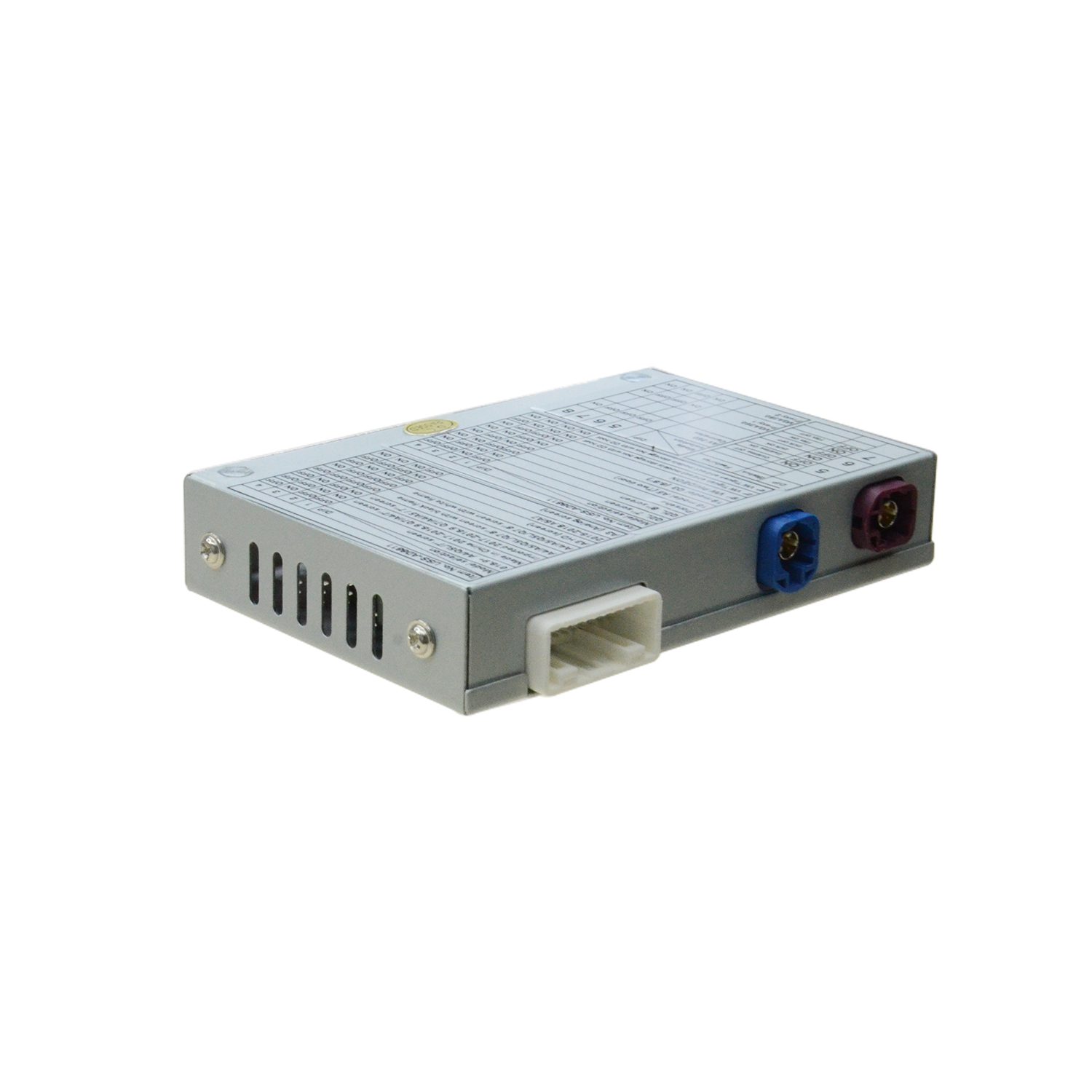
Unichip Backup Camera Interface OEM‑Integrated for 2018‑2020 Range Rover Velar L560. Plug‑play LVDS video adapter adds reversing‑camera, dynamic parking guidelines, DVR and 360‑HD inputs to stock Harman infotainment. Requires CCF parameter adjustment post‑installation. Pair with 2‑in‑1 JLR CCF Tools for configuration work.

Unichip Backup Camera Interface OEM Integrated for JLR 2018‑2020 Range Rover Velar — Product Overview
This Unichip Velar camera interface delivers OEM‑style reversing‑camera integration for DoIP‑based Range Rover Velar L560 model years 2018‑2020. First, many base‑spec Velar vehicles leave production without factory rear‑vision hardware. Meanwhile, this Unichip USS‑LH8846 module injects LVDS video feeds directly into the original Harman infotainment unit. Independent repair and retrofit workshops deploy this hardware to add camera safety features without swapping the factory touch‑screen head‑unit.
In addition, this kit supplies vehicle‑specific Fakra and power inline harnesses. You keep the original OEM wiring intact during installation. After you finish physical fitting, you must edit the vehicle CCF to enable video‑input functions. Use our JET Pro JLR Engineering Tool for full‑module post‑fitment scanning. Also review SDD & Pathfinder offline installation if your workshop lacks suitable diagnostic software.
Core technical functions of Unichip USS‑LH8846 interface
- Reverse‑Gear Auto‑Switch: Automatically triggers rear‑camera display on the factory screen immediately when you select reverse gear.
- Dynamic Parking‑Guideline Overlay: Outputs moving trajectory lines to support low‑speed parking and tight‑space vehicle manoeuvring.
- Multi‑Video‑Input Support: Accept rear‑camera, front HD‑camera, DVR recorder and VGA‑HD 360‑degree panoramic camera signal sources.
- Native LVDS Compatibility: Works with stock Harman LVDS‑based dual‑multimedia infotainment fitted to 2018‑2020 Velar L560 DoIP platforms.
- Plug‑and‑Play Harness Set: Direct‑fit Fakra and power loom connects inline with factory BDC and video connectors; minimise wire‑splicing work.
Vehicle Compatibility & Pre‑Fitment Technical Rules
First, validate your chassis and infotainment revision before ordering. This Unichip unit applies exclusively to Range Rover Velar L560 MY2018‑2020 with Harman LVDS multimedia systems. On the other hand, it will not operate on pre‑2018 CAN‑bus vehicles or post‑2021 revised Velar Pivi‑Pro hardware. Moreover, submit your 17‑digit VIN if you need our pre‑sales compatibility check.
Furthermore, this listing includes only main interface box plus Velar‑specific wiring harness. It does not supply physical rear‑view camera hardware. Always disconnect vehicle 12‑volt battery before you start installation. After hardware fitment, modify CCF parameters to unlock camera inputs, then run full DoIP and MOST‑bus scan to clear any newly triggered DTC faults.
Technician Installation Workflow Summary
After checkout, you receive physical hardware shipment. Next, a qualified technician removes the Velar centre‑stack infotainment assembly. Meanwhile, the technician inserts the Unichip harness inline between factory Fakra video and power connectors. Once you connect all RCA video sources, restore battery power and verify reverse‑gear automatic screen switching. After that, run CCF configuration changes and complete module health verification via JLR diagnostic software.
Critical Technical Notes
This product provides Unichip USS‑LH8846 main interface unit plus Velar‑specific plug‑and‑play harness set. It excludes rear‑camera assemblies, mounting brackets or factory infotainment parts. Improper harness routing may trigger MOST‑bus communication drop‑outs. For manufacturer reference documents, open Land‑Rover’s official owner support portal (external link).
What You Receive On Purchase Completion
- Unichip OEM‑integrated backup‑camera main interface box (USS‑LH8846) for Velar L560
- 2018‑2020 Velar dedicated inline Fakra & power plug‑and‑play harness
- RCA input cables for rear‑cam, front‑cam, DVR and 360‑camera video feeds
- Printed installation manual with complete wiring‑pinout diagrams
- Digital post‑installation CCF‑edit and diagnostic‑verification checklist
Be the first to review “Unichip Backup Camera Interface OEM Integrated for JLR 2018-2020 Range Rover Velar”
Related products
Accessories
Accessories
Accessories
Accessories
Accessories
Accessories
Accessories
Reviews
There are no reviews yet.