


Remote Software Install SDD Pathfinder Work with JLR-DOIP-VCI-WF

$199.00
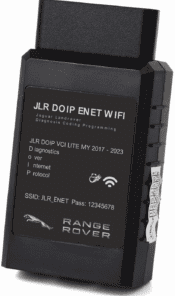
The new JLR DOIP DOIP WiFi was official dealer approved Diagnostics over Internet Protocol (DoIP) Vehicle Communication Interface (VCI) unit is the only unit that will be compatible with Pathfinder and all JLR vehicles with the new vehicle architectures (from the Range Rover/Range Rover Sport (L405/L494) 17MY onwards) or allow the enhanced diagnostics that Pathfinder will offer the retailer.
Remote Software Install SDD Pathfinder configured for JLR‑DOIP‑VCI‑WF. We remotely configure SDD and Pathfinder software so your existing Windows PC works with JLR‑DOIP‑VCI‑WF WiFi interface for JLR diagnostics, coding and ECU programming. Pair with 2‑in‑1 JLR CCF Tools for complete retrofit workflows.

Remote Software Install SDD Pathfinder for JLR‑DOIP‑VCI‑WF — Service Overview
This JLR‑DOIP‑VCI‑WF remote install service configures SDD and Pathfinder diagnostic software on your existing Windows workshop PC to operate with the JLR‑DOIP‑VCI‑WF wireless communication interface. First, many technicians struggle with driver conflicts, DLL files and profile setup after buying the VCI‑WF hardware. Meanwhile, our remote session handles all complex configuration work for you. Independent garages use this service to get fully functional diagnostic software ready for both older CAN‑bus and modern DoIP Jaguar and Land‑Rover vehicles.
In addition, this service only covers software configuration. You supply your own JLR‑DOIP‑VCI‑WF hardware and Windows PC. You can combine this setup with our JET Pro JLR Engineering Tool. Also check our pre‑built hardware bundle Panasonic FZ‑G1 Pathfinder System if you do not own a suitable workshop computer yet.
What our remote installation configures for JLR‑DOIP‑VCI‑WF
- VCI‑WF Driver & DLL Setup: Install and validate correct J2534 drivers so SDD and Pathfinder detect the wireless VCI‑WF unit over USB or WiFi connection.
- SDD Configuration: Tune settings for MY2005‑2018 CAN‑bus platforms. Enable DTC reading, bi‑directional tests and offline module programming functions.
- Pathfinder Configuration: Prepare software for MY2017‑2025 DoIP chassis such as Defender L663, Range Rover L460, Velar and Discovery 5.
- Software Environment Repair: Resolve common dependency errors, registry conflicts and blocked communication ports on your Windows workstation.
- Post‑setup Validation: Run local connection test between installed software and your connected JLR‑DOIP‑VCI‑WF hardware to confirm stable communication.
Workstation & hardware prerequisites
First, confirm your equipment meets minimum requirements before you place an order. Your PC must run Windows 10 or Windows 11 64‑bit. On the other hand, you need a working JLR‑DOIP‑VCI‑WF interface with intact USB‑OBD cables. Moreover, stable internet access is mandatory for our remote desktop session. After configuration completes, core diagnostic tasks can run offline.
How our remote configuration service works
After checkout, schedule your remote session with our technical staff. Next, grant secure remote‑desktop access to your Windows PC while you stay present to supervise every operation. Meanwhile, connect your JLR‑DOIP‑VCI‑WF hardware to the computer during the session. Once configuration and connection‑validation finish, we deliver simple step‑by‑step notes for your daily workshop use.
Critical technical notes for technicians
This service provides remote software configuration only. It does not supply JLR‑DOIP‑VCI‑WF hardware, TOPIx dealer cloud account or software licences. Always back‑up ECU configuration data before you perform ECU flashing or coding jobs. Wrong voltage during programming can permanently damage vehicle modules. For manufacturer reference resources, visit Jaguar’s official software update portal (external link).
Items you receive after purchase completion
- Secure one‑time remote‑desktop SDD & Pathfinder configuration optimised for JLR‑DOIP‑VCI‑WF
- J2534 driver installation, port adjustment and conflict resolution
- Local software‑to‑VCI‑WF connection validation test
- PDF quick‑start guide for VCI‑WF WiFi pairing and software switching between SDD / Pathfinder
- Reference links to compatible CCF‑editing and retrofit‑coding resources
Be the first to review “Remote Software Install SDD Pathfinder Work with JLR-DOIP-VCI-WF”
Related products

Software & Tools
Land Rover Defender L663 Features Activation All-in-one Package

Software & Tools
Software & Tools
Software & Tools
Software & Tools
Software & Tools
Software & Tools
Software & Tools
Reviews
There are no reviews yet.