

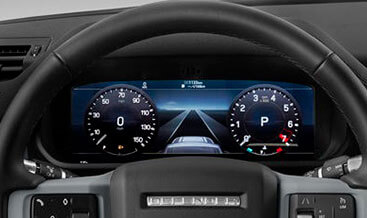
L663 Interactive Driver Display (TFT cluster)

$2,250.00
The advanced 12.3-inch high-resolution interactive display can receive and display large amounts of driver information, multimedia data, and active safety data, including data from navigation systems, partial and, in some models, full-screen navigation, driver assists, telephones, and multimedia devices. Its high resolution provides maximum graphic clarity. You can easily customize it functionally and visually to meet your needs
L663 Interactive Driver Display (TFT Cluster) — Land Rover Defender OEM‑Spec Retrofit Kit
This is a factory‑compliant 12.3‑inch TFT instrument‑cluster retrofit for Land Rover Defender L663 chassis. It fits 2020‑2026 90, 110 and 130 models on the DoIP secure‑gateway platform. The kit supplies genuine OEM IPC hardware plus LVDS signal harness. It supports independent workshops, retrofit specialists and skilled DIY operators.
Product Technical Overview
First, many base‑trim L663 units roll off the line with analogue or limited‑function partial‑TFT clusters. Even after you swap in physical TFT hardware, the system will not operate fully. Instead, it will store persistent DTC faults across IPC, BCM, gateway and Pivi Pro IMC modules. For instance, you may face blank navigation graphics or lost ADAS visual feedback. You may also trigger U0256‑00 communication loss fault codes. Therefore, this retrofit strictly follows JLR TOPIX workshop documentation. It uses OEM‑spec IPC interactive‑driver‑display hardware. It also includes matching LVDS video‑signal harness and factory‑pin‑compatible connectors. In addition, it avoids irreversible dashboard trim cuts during fitment.
Next, full TFT‑cluster functionality requires DoIP‑capable diagnostic hardware. Suitable tools include JLR Enet, JET Pro or Pathfinder software. After physical installation, you need to complete several mandatory diagnostic tasks. To begin, edit CCF parameters to enable the high‑resolution display feature flag. Then, run IPC module adaptation and VIN matching service routine. Following that, perform gateway network‑learning for CAN‑Ethernet bus sync. Finally, clear all retrofit‑related DTCs. As an option, JLR‑Decoder offers on‑site configuration support. We also deliver worldwide remote VIN‑based activation service.
Key Technical Specifications
- Vehicle Compatibility: Defender L663 90 / 110 / 130, 2020‑2026 DoIP secure‑gateway. Supports LHD and RHD variants. It requires functional Pivi Pro IMC infotainment hardware.
- Hardware Scope: OEM 12.3‑inch TFT IPC interactive‑driver‑display unit, LVDS video‑signal harness, cluster mounting fixtures and matching trim bezels.
- Mandatory Diagnostic Procedures: Enable TFT‑display CCF feature flags. Execute IPC module adaptation and VIN alignment. Run gateway network‑learning routine. Sync IPC‑IMC communication channels. Scan and erase all stored DTCs afterward.
- Enabled Factory Functions: Full‑screen in‑cluster navigation mapping. Configurable virtual gauge layouts. Terrain‑response animation graphics. ADAS driver‑assist visual feedback. Media and phone call overlay on driver display.
- Electrical Interface: 12 V vehicle power supply. High‑speed CAN‑Ethernet and LVDS video signalling. OEM sealed pin‑matched connectors.
- Deliverables: OEM TFT‑cluster hardware assembly. TOPIX‑aligned installation procedure. Access to TEC‑DOC instrument‑system interactive wiring diagrams.
JLR‑Compliant 3‑Stage Retrofit Workflow
- VIN Pre‑Validation: First, submit your 17‑digit VIN to our JLR‑Decoder VIN‑Decoder tool. This step checks your factory instrument build, existing harness provision and gateway‑module variant. As a result, you confirm full compatibility before you place your order. Some vehicles need additional loom upgrades for LVDS signals.
- Physical Hardware Installation: Start by disconnecting the 12V battery per TOPIX safety instructions. Then remove the original instrument‑cluster and dashboard trim. Fit the new TFT IPC unit and secure mounting fixtures. Next, route and lock in the LVDS video‑signal harness. Lastly, reassemble dashboard trim pieces and reconnect vehicle battery.
- DoIP Diagnostic Activation & Calibration: Connect your DoIP VCI interface. To start, edit CCF and activate interactive‑driver‑display feature parameters. After that, run IPC adaptation and VIN‑matching service routine. Then execute gateway network‑learning for bus synchronisation. Once finished, clear all retrofit‑generated DTCs. In the end, validate navigation overlay and gauge functions via TEC‑DOC functional‑test procedures.
Important Technical Notes & Limitations
Pure software‑only activation will not work for analogue‑cluster base vehicles. You must install physical TFT IPC and valid LVDS harness hardware. Once you finish the retrofit, run a complete module scan. Use our JLR‑Decoder DTC library to check for instrument‑system fault codes. If IPC‑IMC bus sync fails, navigation map content will not render inside the driver display. Furthermore, this kit works only with intact Pivi Pro infotainment systems. Damaged IMC units must be repaired before you perform this retrofit.
What You Receive
Your order includes OEM‑grade Interactive Driver Display TFT‑cluster hardware. It contains the IPC instrument‑panel unit, LVDS video harness, mounting fixtures and matching trim parts. You also receive technical installation guidance plus access to relevant TEC‑DOC wiring resources. At checkout, you can select self‑configuration or our remote JLR diagnostic activation service. Meanwhile, workshop clients may add print tokens for licensed TOPIX service‑document exports.
Start with free VIN decode: Confirm your Defender L663 instrument‑hardware compatibility before purchase. Moreover, contact our technical team for bulk workshop pricing and remote‑coding bookings.
Be the first to review “L663 Interactive Driver Display (TFT cluster)”
Related products

OEM Retrofits
OEM Retrofits
OEM Retrofits

OEM Retrofits
OEM Retrofits
Evoque 2021+
OEM Retrofits
Reviews
There are no reviews yet.