

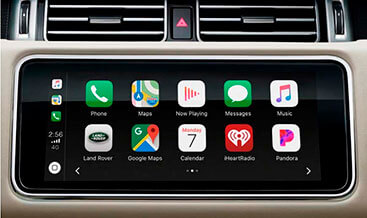
Range Rover Sport Apple CarPlay and Android Auto Pack activation
$99.00
Range Rover Sport Sharing approved
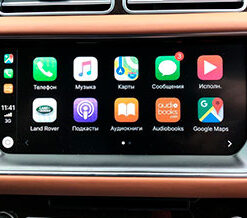
applications from your phone to the central infotainment screen. Use your
apps safely while driving. Connect your phone via a USB socket in the
armrest. Additional navigation with traffic jams (Google Maps, Waze, etc.),
weather, music, calendar, contacts, and much more from your phone will be
available for control from the central monitor.
Range Rover Sport Apple CarPlay and Android Auto Pack Activation
Our team delivers native VIN‑based software activation for the full Smartphone Pack. We apply factory‑aligned CCF configuration edits to unlock Apple CarPlay and Android Auto, and you do not fit any aftermarket dongles or extra hardware.
Product Technical Overview
Many Range Rover Sport units roll off the production line with fully capable infotainment hardware, yet JLR disables the smartphone projection features for specific regional market trims. For instance, L494 (2014‑2022) Touch‑Pro / Touch‑Pro Duo and L461 (2023‑2026) MLA‑platform Pivi‑Pro head‑units hold the required ICM hardware, but they hide CarPlay and Android Auto menu entries inside the CCF (Car Configuration File) dataset. As a result, owners cannot access navigation, voice assistant, media streaming and hands‑free calling from their mobile phones.
Therefore, our activation service directly modifies the relevant CCF parameters over DOIP diagnostic protocol. Specifically, we toggle SMARTPHONE_PACK_CARPLAY and SMARTPHONE_PACK_ANDROID_AUTO flags from “Not Present” to “Present” within your vehicle’s as‑built VBF profile. In addition, we validate ICM firmware revision; older hardware revisions may need a firmware flash before the features operate correctly. Unlike third‑party emulator boxes, this coding uses genuine JLR Pathfinder or CCF‑Tools 4.6/4.8 workflows, matching dealer‑grade standards from our JLR‑Decoder platform. Meanwhile, we keep all other ECU calibrations untouched, including ADAS, powertrain, body control modules and original factory infotainment functions.
Vehicle Compatibility
- Range Rover Sport L494 (2014‑2022): Touch‑Pro / Touch‑Pro Duo infotainment
- Range Rover Sport L461 (2023‑2026): MLA platform with Pivi‑Pro DOIP‑based infotainment
Critical prerequisite: Your vehicle must contain the correct physical USB‑data port inside the armrest. Charging‑only USB ports cannot support smartphone projection. We validate hardware eligibility against your VIN factory build‑sheet after checkout.
What This Activation Pack Includes
- We perform VIN‑specific CCF editing for both Apple CarPlay and Android Auto feature flags
- We run pre‑activation hardware validation against JLR factory build‑sheet data
- We deliver your original as‑built CCF / VBF backup file for safe roll‑back
- We provide guided programming workflow; you supply JLR Enet‑WiFi or DOIP VCI adapter
- We complete post‑coding full DTC scan to ensure zero new diagnostic trouble codes
- We share technical documentation for ignition‑cycle and phone‑pairing verification steps
Step‑by‑Step Technical Workflow
- First, submit your 17‑digit JLR VIN during checkout. Our technicians cross‑check infotainment hardware and USB port configuration.
- Next, we generate the tuned VBF CCF file with both smartphone‑pack parameters enabled. If necessary, we outline ICM firmware‑upgrade requirements.
- Then, you connect your Enet‑WiFi / DOIP VCI adapter and launch Pathfinder or CCF‑Tools 4.8 on your Windows laptop.
- After that, flash the modified CCF profile to the vehicle gateway. Complete an ignition power cycle to apply configuration changes.
- Subsequently, run a global DTC scan across all control modules to confirm fault‑free status.
- Finally, test functionality: connect your compatible iPhone or Android device via certified USB cable and confirm CarPlay / Android Auto menus appear on the main touch‑screen.
Important Technical Notes
First of all, this service delivers native OEM‑style integration, not third‑party emulation. Even so, official JLR dealer software updates can reset CCF parameters back to factory defaults; in that case you will need re‑activation. Furthermore, wireless CarPlay / Android Auto capability depends on your head‑unit firmware version and vehicle WiFi hardware. On the other hand, wired projection works for all validated compatible units. You also need to use genuine certified USB data cables; charging‑only cables will fail projection connection.
Frequently Asked Technical Questions
Q: Will coding create fault codes in vehicle modules?
A: When you deploy our VIN‑matched CCF profile correctly, no DTC faults will log. Our service scope includes post‑coding DTC validation.
Q: Do I need to ship any physical hardware?
A: We provide pure software activation. You must own a compatible JLR Enet‑WiFi or DOIP VCI diagnostic adapter for programming.
Q: Can I get wireless CarPlay after this activation?
A: Wireless support relies on your existing ICM firmware and onboard WiFi hardware. Our pre‑check will tell you whether wireless functions are feasible for your exact vehicle.
Be the first to review “Range Rover Sport Apple CarPlay and Android Auto Pack activation”
Related products
Feature Activations
Feature Activations

Feature Activations
Feature Activations
Feature Activations
Range Rover 2017 Apple CarPlay and Android Auto Pack activation
Feature Activations
Feature Activations
Range Rover 2017 Traffic Sign Recognition and Driver Drowsy Monitor (TSR + DDM)
Feature Activations
Reviews
There are no reviews yet.