

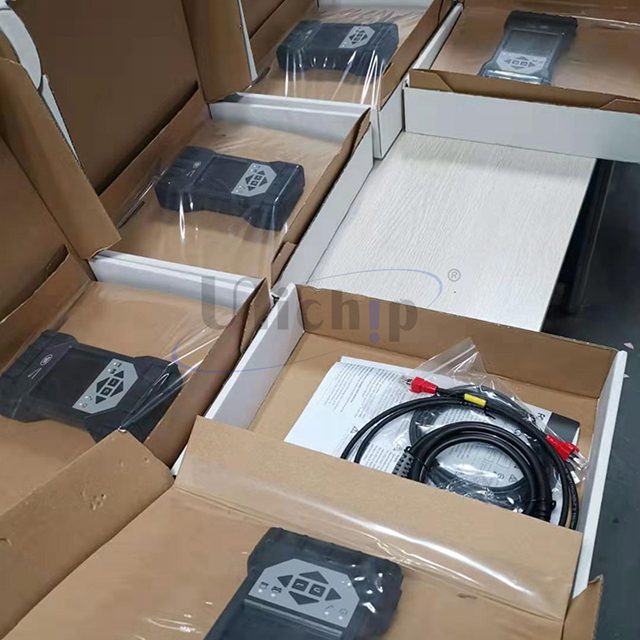
JLR DOIP VCI SDD Pathfinder Interface JLR-DOIP-VCI-WF

$1,799.00
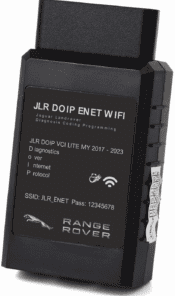
The new JLR DOIP DOIP WiFi was official dealer approved Diagnostics over Internet Protocol (DoIP) Vehicle Communication Interface (VCI) unit is the only unit that will be compatible with Pathfinder and all JLR vehicles with the new vehicle architectures (from the Range Rover/Range Rover Sport (L405/L494) 17MY onwards) or allow the enhanced diagnostics that Pathfinder will offer the retailer.
JLR‑DOIP‑VCI‑WF Vehicle Communication Interface. WiFi & USB J2534 pass‑thru hardware compatible with SDD and Pathfinder. Covers legacy CAN‑bus and modern DoIP Jaguar Land‑Rover for diagnostics, coding and ECU flashing. Software sold separately. Pair with SDD & Pathfinder offline software for full‑workshop setup.

JLR DOIP VCI SDD Pathfinder Interface JLR‑DOIP‑VCI‑WF — Product Overview
This JLR‑DOIP‑VCI‑WF interface is a professional J2534‑compliant vehicle communication hardware for Jaguar and Land‑Rover service workshops. First, it combines wired USB and stable wireless WiFi connectivity. Meanwhile, this single physical unit replaces older‑generation SDD‑only VCIs. Independent repair shops and retrofit specialists rely on this hardware to handle both classic CAN‑bus and latest high‑speed DoIP vehicle architectures from MY2005 through MY2025.
In addition, this hardware works with SDD for pre‑2017 vehicles and Pathfinder for 2017+ DoIP chassis such as Defender L663, Range Rover L460 and Velar. You may also use it alongside our JET Pro JLR Engineering Tool. Also review our 2‑in‑1 JLR CCF Tools if you plan to run CCF editing and retrofit coding jobs.
Core technical features of JLR‑DOIP‑VCI‑WF
- Dual Connection Mode: Operate via USB 2.0 wired link or secure 802.11 WiFi wireless connection for flexible bay‑side technician workflows.
- Multi‑Protocol Hardware: Natively supports DoIP ISO‑13400, High‑Speed / Fault‑Tolerant CAN, MultiCAN, ISO9141 K‑Line and SCP vehicle communication networks.
- Full SDD & Pathfinder Compatibility: Acts as J2534 pass‑thru device. Run DTC reading, bi‑directional actuation, module identification and offline ECU programming tasks.
- Circuit Protection: Built‑in voltage isolation and surge protection. Reduces risk of PC or vehicle module damage during long flashing sessions.
- Firmware Upgradable: Apply updated J2534 firmware files to keep hardware compatible with new JLR model releases.
Vehicle & Workstation Technical Requirements
First, clarify what this hardware can and cannot do before purchase. This VCI supports JLR MY2005‑2025. On the other hand, it does not include SDD, Pathfinder or any engineering‑software licences. Moreover, your workshop PC must run Windows 10 or Windows 11 64‑bit. You install matching J2534 DLL drivers to establish communication between software and the VCI hardware.
Furthermore, always maintain stable 12‑volt vehicle battery voltage while you perform ECU flashing. Voltage drops during programming can cause permanent module bricking. WiFi mode suits quick diagnostic checks; use wired USB connection for heavy‑duty firmware‑write operations.
Hardware Setup Workflow Summary
After checkout, you receive physical JLR‑DOIP‑VCI‑WF unit plus OBD‑16 and USB cables. Next, a technician installs supplied J2534 driver files on your Windows workstation. Meanwhile, plug the VCI into vehicle OBD‑II port. Connect over USB or pair WiFi network. Once software detects the hardware, run a quick communication test before you start diagnostic or programming work.
Critical Technical Notes for Technicians
This listing supplies only JLR‑DOIP‑VCI‑WF physical hardware plus accessory cables. Software, subscriptions and CCF‑editing licences sell separately. Never disconnect power or communication links mid‑flash operation. For manufacturer reference documentation, open Land‑Rover’s official owner support portal (external link).
What You Receive On Purchase Completion
- JLR‑DOIP‑VCI‑WF WiFi & USB J2534 pass‑thru main hardware unit
- Vehicle OBD‑16 interface cable and 2‑metre USB data cable
- Digital download package with J2534 driver files and firmware update utility
- Print‑ready hardware quick‑start installation guide
- PDF checklist for pre‑programming battery‑voltage and connection validation
Be the first to review “JLR DOIP VCI SDD Pathfinder Interface JLR-DOIP-VCI-WF”
Related products
Software & Tools
JET Master JLR Engineering Tool SX-Tool JLR Coding Programming
Software & Tools
Software & Tools
Software & Tools
Software & Tools
Software & Tools
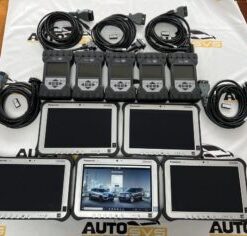
2022 Pathfinder System Panasonic FZ-G1 i5 6300 with JLR DOIP VCI WF
Software & Tools
Software & Tools
Reviews
There are no reviews yet.