


L663 Defender Wi‑Fi Hotspot activation service for 2020‑2026 Defender L663. CCF coding unlocks factory TCU‑based in‑car Wi‑Fi hotspot. Requires DOIP hardware & Pathfinder. Submit your 17‑digit VIN after checkout.
L663 Defender Wi‑Fi Hotspot Activation for TCU‑Based In‑Car Connectivity
Our L663 Defender Wi‑Fi Hotspot activation provides professional Car‑Configuration‑File coding for Land Rover Defender L663 (2020‑2026). The factory‑fitted Telematics Control Unit (TCU) contains an integrated 4G‑LTE modem capable of broadcasting an in‑cabin Wi‑Fi hotspot supporting up to eight connected devices. Many L663 vehicles ship with fully‑functional TCU hardware, yet Wi‑Fi hotspot feature bits remain disabled within the CCF due to regional market build settings. Our service enables the Wi‑Fi hotspot via DOIP diagnostic protocol without physical module replacement. Always validate your VIN build and telematics hardware fitment with our free JLR VIN Decoder before purchase.
Vehicle & Hardware Eligibility For L663 Wi‑Fi Hotspot Coding
- Land Rover Defender L663 chassis, MY2020‑2026 with fully operational factory Telematics Control Unit (TCU) and Pivi‑Pro infotainment
- This CCF modification cannot add missing TCU modem hardware; the physical telematics module must be fault‑free with no active network‑related DTCs
- Authenticated DOIP‑capable VCI is mandatory such as our JET‑Pro Engineering Tool plus Pathfinder V374+; generic ENET cables cannot bypass L663 secure‑gateway authentication
- Supports NAS, EU, UK and RoW market builds; regional telematics restrictions may apply for certain VIN specifications
- Important note: This L663 Defender Wi‑Fi Hotspot activation only enables software‑locked feature; a valid SIM‑card and mobile‑data subscription are required separately for internet connectivity.
Connectivity Functions Enabled After CCF Parameter Update
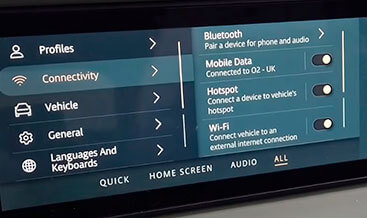
After applying the VIN‑specific CCF change‑set and completing TCU plus Pivi‑Pro soft‑reset, this L663 Defender Wi‑Fi Hotspot activation unlocks native in‑car Wi‑Fi‑hotspot menus within Pivi‑Pro connectivity settings. Once activated, occupants can connect smartphones, tablets and laptops to the vehicle‑broadcast SSID using the on‑screen hotspot password. The system leverages the vehicle roof‑mounted cellular antenna for improved mobile‑network reception compared to consumer‑device hotspots. For additional infotainment‑related configuration changes review our CCF Tools category.
Technical Workflow To Complete Wi‑Fi Hotspot Activation
- Complete checkout and submit your full 17‑digit JLR VIN for Defender L663.
- Our technicians validate factory build records, verify TCU part‑numbers and prepare VIN‑locked CCF change‑set with Wi‑Fi‑hotspot feature‑bits enabled.
- Connect authenticated DOIP VCI, maintain stable 12.6V+ battery voltage and open Pathfinder diagnostic session with vehicle secure gateway.
- Import custom CCF dataset, execute TCU and infotainment soft‑resets, allow full vehicle sleep‑wake cycle, then verify Wi‑Fi Hotspot menu visibility inside Pivi‑Pro connectivity settings.
Mandatory Pre‑Conditions Before Placing Your Order
- No active DTC faults on TCU telematics module, Pivi‑Pro or secure‑gateway before starting CCF write procedure.
- Stabilised battery power supply during configuration to prevent aborted writes or module sleep events.
- On‑site requirement: authenticated DOIP diagnostic hardware and fully‑functional Pathfinder software installation.
- Post‑activation vehicle sleep‑wake cycle is mandatory per JLR TOPIx workshop procedure for TCU configuration to take full effect.
Service Deliverables & JLR‑Trained Technical Support
You receive VIN‑bound validated CCF package plus workshop‑ready step‑by‑step configuration instructions. Valid VIN submissions qualify for same‑business‑day turnaround. Our JLR‑trained support assists repair shops and advanced operators for configuration troubleshooting. This is coding‑only service; no physical parts or SIM‑cards are dispatched. For official L663 telematics‑system background you can review public resources on the Land Rover official site.
Be the first to review “L663 Wi-Fi Hotspot activation”
Related products

Feature Activations

Feature Activations
Feature Activations
Range Rover 2017 Apple CarPlay and Android Auto Pack activation
Feature Activations

Feature Activations
Feature Activations
Feature Activations

Feature Activations
Reviews
There are no reviews yet.