

L663 Head-Up Display

$6,500.00
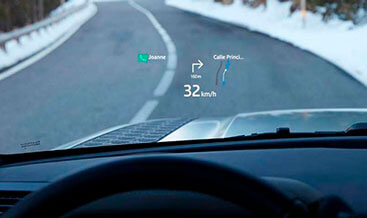
Head-up Display is an option that presents key vehicle data such as your speed, gear position, and navigation directions on the windscreen.
GEN2 Head-up Display has full-color graphics in high resolution, enabling you to see all driver inputs and information with ease. It can display important information from the infotainment
Touchscreen including phone information such as an incoming call. All the information can be turned on and off depending on the driver’s preference
L663 Defender Head‑Up Display HUD activation service for 2020‑2026 Defender L663. CCF coding enables OEM windscreen‑projected HUD. Requires fitted HUD projector and HUD‑compatible windscreen, DOIP hardware & Pathfinder. Submit your 17‑digit VIN after checkout.
L663 Defender Head‑Up Display HUD Activation
Our L663 Defender Head‑Up Display HUD activation delivers HUDCM and CCF configuration for Land Rover Defender L663 (2020‑2026). First, genuine OEM HUD projects key driver data onto a special wedge‑film windscreen. It shows vehicle speed, gear position, navigation prompts and ADAS alerts directly in the driver’s line‑of‑sight. As a result, drivers keep eyes on the road without glancing down at the instrument cluster. Many L663 vehicles receive the HUD projector module from factory or aftermarket retrofit. Even so, HUD menu and data routing stay disabled in the Central Configuration File due to original trim‑level restrictions. Our service enables HUD feature‑bits over DOIP diagnostic protocol. Note we do not supply physical projector, windscreen or wiring harness components. Before you buy, validate your VIN and HUD hardware part‑numbers. You can use our free JLR VIN Decoder.
Vehicle & Hardware Eligibility For L663 HUD Coding
- Use this service for Land Rover Defender L663, MY2020‑2026. It needs a fully‑installed genuine HUDCM projector assembly plus HUD‑specific combiner‑film windscreen. Standard non‑HUD glass cannot produce correct projected imagery.
- This CCF edit cannot add missing projector or windscreen hardware. So you must finish all mechanical fitment and CAN‑bus wiring connections first. HUDCM, IMC and BCM must show zero HUD‑related DTC faults before programming.
- You need authenticated DOIP‑capable VCI hardware. For example, our JET‑Pro Engineering Tool works perfectly. Pair it with Pathfinder V374 or newer software. Generic ENET cables cannot bypass the L663 secure gateway.
- The service supports NAS, EU, UK and RoW market vehicles. Still, some regional build rules may limit certain HUD‑content sets for specific VIN records.
- Keep this key note in mind: this service only unlocks software‑locked HUD logic. After coding, you still complete HUD geometry and brightness calibration. Follow JLR TOPIx workshop procedures strictly for this step.
Driver‑Display Functions Enabled After CCF Parameter Update
Once you apply our VIN‑specific CCF change‑set, trigger soft‑resets for HUDCM, IMC and BCM modules. Next, full OEM Head‑Up Display functionality becomes active. First, projected content includes road speed, selected gear, navigation turn‑by‑turn directions and active ADAS warning notifications. Second, Pivi‑Pro adds dedicated HUD adjustment menus. Drivers can tweak projection height, rotation and automatic ambient‑light brightness. As a result, the system adapts for bright daylight or dark night‑time driving. HUD‑related instrument‑cluster warning messages clear after successful configuration. If you need extra infotainment‑display configuration jobs, browse our CCF Tools category.
Technical Workflow To Complete HUD Activation
- First, finish checkout and submit your full 17‑digit JLR VIN. Also confirm you have fitted genuine HUD projector and HUD‑compatible windscreen with complete wiring.
- Then our technical team reviews your factory build records. We verify HUDCM projector and IMC module part numbers. After that, we generate a VIN‑locked CCF file that enables Head‑Up Display feature‑bits.
- Next, connect your authenticated DOIP VCI unit. Hold battery voltage stable above 12.6 V. Open and authenticate your Pathfinder session against the vehicle secure gateway.
- Finally, import the custom CCF dataset. Run multi‑module soft‑resets. Clear historic HUD‑system DTCs. Complete HUD geometry and brightness calibration, then perform road‑test to verify projected‑image quality and content output.
Mandatory Pre‑Conditions Before Placing Your Order
- Clear all related active DTCs ahead of time. Check HUDCM projector, IMC infotainment, BCM and vehicle secure gateway.
- Maintain stable battery power through the whole coding session. Voltage drops will corrupt CCF writes or force display modules into sleep state.
- Prepare these items on‑site: authenticated DOIP diagnostic hardware, working Pathfinder install, fully‑wired genuine HUD projector and HUD‑spec windscreen.
- After activation, run a complete function test. Finish HUD calibration and validate projected‑image performance. Follow official JLR TOPIx workshop standards for this validation step.
Service Deliverables & JLR‑Trained Technical Support
You will receive VIN‑bound validated CCF package. You also get clear workshop‑oriented configuration and HUD‑calibration instructions. Meanwhile, we deliver valid VIN requests within the same business day in most cases. Our JLR‑trained support team works with repair shops and retrofit specialists. They help resolve any HUD‑CM configuration‑related issues. This remains a pure coding‑only service. We do not ship physical projector, windscreen or wiring components. For official driver‑display‑system background information, visit public resources on the Land Rover official site.
Be the first to review “L663 Head-Up Display”
Related products
OEM Retrofits

OEM Retrofits
OEM Retrofits

OEM Retrofits
OEM Retrofits
OEM Retrofits
OEM Retrofits
OEM Retrofits
Reviews
There are no reviews yet.