

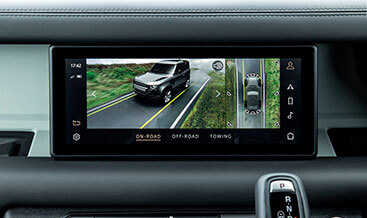
L663 3D Surround Camera
$4,800.00
Helping to see more thanks to the ability to simulate a 3D view around the car.
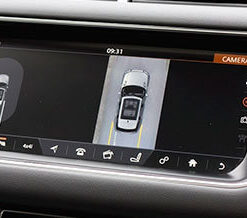
New 3D exterior perspectives alongside a 360° overhead view make maneuvering easier, while off-road views including the innovative ClearSight Ground View provide you with confidence when scaling various terrains.
L663 3D Surround Camera — Land Rover Defender OEM‑Spec Retrofit Kit
Factory‑grade 3D Surround Camera retrofit solution for Land Rover Defender L663 chassis (2020‑2026: 90, 110, 130 DoIP secure‑gateway platform). Complete OEM camera array, IPMB (Image Processing Module B) vision hardware and JLR‑compliant diagnostic programming, built for independent repair workshops, retrofit specialists and advanced DIY operators.
Product Technical Overview
Base‑trim L663 vehicles are often delivered without the full 3D surround‑vision hardware; installing camera hardware alone without correct module programming and CCF feature‑flag activation will store persistent DTC faults within IPMB, ICCM infotainment and body gateway modules, including common fault codes B115E‑31 and U3000‑96. This retrofit strictly follows JLR TOPIX workshop documentation standards. It uses OEM wide‑angle perimeter cameras, dedicated IPMB vision ECU and factory‑matching wiring harnesses; no destructive body or bumper cutting is required for genuine‑part fitment.
Full 3D surround‑view functionality requires DoIP‑capable diagnostic hardware such as JLR Enet / JET Pro or Pathfinder software. Critical post‑fit steps include CCF parameter editing, IPMB module initialization, camera geometric calibration and full DTC erasure. JLR‑Decoder supports on‑site tool‑based configuration or worldwide remote VIN‑based activation service.
Key Technical Specifications
- Vehicle Compatibility: Defender L663 90 / 110 / 130, 2020‑2026 DoIP secure‑gateway architecture, LHD & RHD configurations
- Hardware Scope: Four OEM wide‑angle surround cameras, IPMB image processing module, CAN‑bus compliant wiring harness, mounting fixtures
- Mandatory Diagnostic Procedures: CCF feature‑flag enablement, IPMB service‑routine initialization, multi‑camera geometric calibration, gateway & ICCM configuration update, full DTC scan & clearing
- Enabled Factory Functions: 3D bird’s‑eye surround overlay, dynamic parking guidance lines, ClearSight ground‑view, junction view, low‑speed park‑aid integration, infotainment screen rendering
- Electrical Interface: 12 V vehicle supply, high‑speed CAN communication, OEM pin‑compatible sealed connectors
- Deliverables: OEM hardware set, TOPIX‑aligned installation procedure, access to TEC‑DOC interactive wiring diagrams for the vision system
JLR‑Compliant 3‑Stage Retrofit Workflow
- VIN Pre‑Validation: Submit your 17‑digit VIN to the JLR‑Decoder VIN‑Decoder tool to verify factory build status, existing wiring provision and gateway module variant prior to ordering. Some partial‑fit vehicles may require loom upgrades.
- Physical Hardware Installation: Dismantle bumpers, side‑mirror assemblies and interior trim per TOPIX service instructions; mount all four perimeter cameras and IPMB control module; route and secure CAN‑bus harness, verify connector lock engagement.
- DoIP Diagnostic Activation & Calibration: Connect DoIP VCI interface. Edit CCF to enable surround‑vision feature parameters; run IPMB initialization service routine; execute mandatory camera geometric calibration; clear all retrofit‑related DTCs; validate all 3D view modes via TEC‑DOC functional test procedures.
Important Technical Notes & Limitations
A small subset of higher‑trim L663 units already contain complete camera and IPMB hardware but have features locked by CCF trim settings; our VIN pre‑check will identify software‑only activation candidates. After completion, perform a full module scan with the JLR‑Decoder DTC library to confirm zero vision‑system faults. Incorrect camera calibration will result in distorted stitching of the 3D surround image. This kit does not add Wade Sensing unless the optional wade‑sensor hardware is added separately.
What You Receive
Order includes OEM‑spec 3D surround‑camera hardware set, IPMB vision processing module, CAN‑bus wiring harness, mounting hardware and technical installation guidance plus access to relevant TEC‑DOC wiring resources. You may select self‑configure or remote JLR diagnostic activation service during checkout. Workshop clients are able to add print tokens for licensed export of TOPIX service documentation.
Start with free VIN decode: Confirm your Defender L663 hardware compatibility before purchase. Contact our technical support for multi‑unit workshop pricing and remote‑coding booking information.
Be the first to review “L663 3D Surround Camera”
Related products
OEM Retrofits
OEM Retrofits
Evoque 2021+
OEM Retrofits
OEM Retrofits
OEM Retrofits
Reviews
There are no reviews yet.