

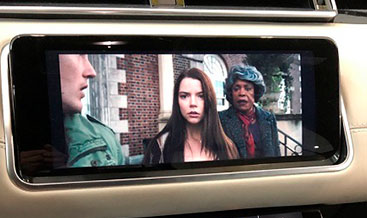
Range Rover Sport Video in Motion
$49.00
Range Rover Sport For driving safety,
when the car is moving, video playback from a USB or DVD stops. But often,
our passengers and children want to watch the video during long trips. We
offer to remove this restriction and make it possible to play video on the
central touchscreen whenever you want.
Range Rover Sport Video in Motion Activation
Our team delivers remote VIN‑based software activation to enable Video‑In‑Motion (VIM) for Range Rover Sport. We apply factory‑style CCF configuration changes to remove the factory motion‑lock restriction on front infotainment video playback, and you do not need to install any hardware modifications.
Product Technical Overview
First, let’s break down the factory limitation. Modern Range Rover Sport models (L494 2014‑2022 and L461 2023‑2026) lock the front infotainment video output while the vehicle moves. As soon as the vehicle registers speed above the stationary threshold, the head unit blanks or mutes all front‑screen video sources including USB video, DVD media and HDMI inputs for driver distraction safety.
Our Video‑in‑Motion service directly edits core CCF (Car Configuration File) parameters over the DOIP diagnostic protocol. Specifically, we adjust the VIDEO_PLAYBACK_MOVING configuration flag inside the head unit dataset so the infotainment system keeps playing video while the vehicle travels. Furthermore, this solution relies purely on software; you do not need wiring changes or aftermarket interface boxes.
We build the configuration profile against your vehicle’s unique VIN and follow JLR Pathfinder / CCF‑Tools engineering workflows that match dealer‑grade diagnostic standards on our JLR‑Decoder platform. Meanwhile, this tweak leaves all remaining factory safety modules untouched. The instrument cluster, ADAS and powertrain configurations stay fully intact. Please note that this feature works exclusively for passenger entertainment, and drivers must comply with local regional traffic legislation if they operate the vehicle.
Vehicle Compatibility
- Range Rover Sport L494 (2014‑2022): Touch‑Pro / Touch‑Pro Duo infotainment
- Range Rover Sport L461 (2023‑2026): MLA platform with Pivi‑Pro infotainment (DOIP architecture)
Important prerequisite: Your vehicle must carry a factory video‑capable head unit with USB video, DVD or HDMI input. If your vehicle lacks native video hardware, you cannot activate this function.
What We Include In This Activation Service
- We edit your VIN‑specific CCF parameters to enable Video‑In‑Motion
- We provide step‑by‑step remote guided programming workflow (you supply a compatible OBD‑Enet adapter)
- We create and deliver a pre‑programming as‑built CCF backup file tied to your vehicle VIN
- We perform post‑activation diagnostic validation via DTC scan to confirm no new fault codes
- We supply technical documentation that explains the ignition‑cycle verification procedure
Step‑by‑Step Technical Workflow
- First, submit your 17‑digit JLR VIN at checkout. Our team validates your infotainment hardware configuration against official JLR factory build‑sheet data.
- Next, we generate a modified VBF CCF profile with the adjusted VIDEO_PLAYBACK_MOVING parameter.
- Then, you upload the tuned configuration over DOIP through your E‑Net OBD adapter using JLR Pathfinder or CCF‑Tools 4.6/4.8.
- After that, complete an ignition cycle. Run a full DTC scan to verify zero new diagnostic trouble codes across infotainment and body control modules.
- Finally, run the functional test: launch your preferred video source and drive the vehicle to confirm the front main display keeps active video output.
Important Technical & Legal Notes
When you modify factory CCF configuration, you must check regional compliance requirements. We design this service only for off‑road or passenger‑only use. In addition, you hold full responsibility to confirm local road laws for in‑motion front‑display video playback. This software change never alters crash‑safety, ADAS or powertrain calibrations. However, JLR official dealer software updates may reset CCF parameters back to factory defaults, which means you will need a re‑activation service after such updates.
Frequently Asked Technical Questions
Q: Will this throw DTC fault codes?
A: If we complete the coding correctly with a valid VIN‑matched CCF profile, the vehicle will not log DTC codes. We include post‑coding DTC validation inside our service scope.
Q: Do I need physical hardware shipped to me?
A: We ship no hardware. You just need a compatible JLR Enet‑WiFi OBD adapter to run the remote programming procedure.
Q: Does this work for Apple CarPlay video streaming?
A: Our VIM unlock works for native vehicle‑side video sources such as USB video, DVD and HDMI. On the other hand, Apple controls CarPlay streaming limits through CarPlay firmware constraints, so this change will not bypass those limits.
Be the first to review “Range Rover Sport Video in Motion”
Related products
Feature Activations
Feature Activations
Feature Activations
Feature Activations

Feature Activations
Feature Activations
Feature Activations
Feature Activations
Reviews
There are no reviews yet.